Create system and security policies for free
Gpedit.msc by Davhc is a free Group Policy Editor for Windows 10 users. You may modify users and system settings on a networked or local machine using Group Policy. You may configure any part of the system, including network and security policies, as well as Windows OS functions and program settings.
Top Recommended Alternative

Local group policies will almost always necessitate modifications to the Windows registry, although users may customize their Windows operating system using gpedit.msc. If you have used CCleaner and Advanced SystemCare before, Gpedit.msc may be the alternative program for you.
How do I enable Gpedit MSC in Windows 10?
The Group Policy Editor is used in a network environment to set anything from what programs are authorized to run to desktop customization. This is done in collaboration with Active Directory. You may still utilize Local Group Policy Objects (LGPOs) to configure our PCs if you don't have an Active Directory. The Group Policy Editor is incompatible with Windows 10 Home Edition, though.
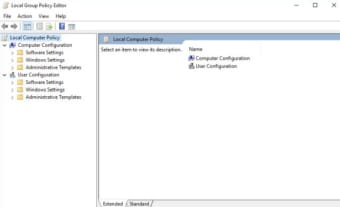
Only Windows 10 Pro and Windows 10 Enterprise can recognize this program. You'll see two primary categories on the left side of the window once you have the program running. There are 2 types of system configuration: computer and user. The policies under Computer Configuration will apply to the entire machine and have an impact on the computer and operating system's overall functionality. User Configuration will apply to individuals with accounts on your PC.
These options remain constant regardless of who is signed in to the computer. Consider Group Policy Editor as a secure approach to deal with the Windows Registry. Although Group Policy Editor does not enable you to alter everything in the Windows Registry, it does enable you to alter practically most programs, features, and capabilities on your computer.
Create multiple default settings
Gpedit.msc handles a wide variety of options to implement settings and adjust user defaults. You may use the Local Group Policy Editor application to configure the choices with a GUI while operating Windows 10 Pro, Enterprise, or Education Edition. Gpedit.msc is not included on Windows 10 Home, unfortunately. You are compelled to make all the group policies necessary by registry adjustments if you are a Windows 10 Home user.